スナップショットテスト
スナップショットのテストはUI が予期せず変更されていないかを確かめるのに非常に有用なツールです。
典型的なスナップショットテストでは、UIコンポーネントをレンダリングし、スナップショットを撮り、テストと一緒に保管されているスナップショットファイルと比較します。 2つのスナップショットが一致しない場合テストは失敗します: 予期されない変更があったか、参照するスナップショットが新しいバージョンのUIコンポーネントに更新される必要があるかのどちらかです。
Jestにおけるスナップショットテスト
React コンポーネントをテストする場合にも、同様のアプローチをとることができます。 Instead of rendering the graphical UI, which would require building the entire app, you can use a test renderer to quickly generate a serializable value for your React component. Consider this example test for a Link component:
import {render} from '@testing-library/react';
import Link from '../Link';

it('renders correctly', () => {
  const {container} = render(
    <Link page="http://www.facebook.com">Facebook</Link>,
  );
  expect(container.firstChild).toMatchSnapshot();
});
The first time this test is run, Jest creates a snapshot file that looks like this:
exports[`renders correctly 1`] = `
<a
  aria-label="normal"
  class="normal"
  href="http://www.facebook.com"
>
  Facebook
</a>
`;
生成されるスナップショットはコードの変更に追随し、かつコードレビューのプロセスの一部としてレビューされるべきです。 Jest uses pretty-format to make snapshots human-readable during code review. On subsequent test runs, Jest will compare the rendered output with the previous snapshot. それらが一致すれば、テストを通過します。 If they don't match, either the test runner found a bug in your code (in the <Link> component in this case) that should be fixed, or the implementation has changed and the snapshot needs to be updated.
The snapshot is directly scoped to the data you render – in our example the <Link> component with page prop passed to it. This implies that even if any other file has missing props (say, App.js) in the <Link> component, it will still pass the test as the test doesn't know the usage of <Link> component and it's scoped only to the Link.js. Also, rendering the same component with different props in other snapshot tests will not affect the first one, as the tests don't know about each other.
More information on how snapshot testing works and why we built it can be found on the release blog post. We recommend reading this blog post to get a good sense of when you should use snapshot testing. We also recommend watching this egghead video on Snapshot Testing with Jest.
スナップショットの更新
バグが混入した後でスナップショットテストが失敗したときは簡単に目星がつきます。 テストが失敗したら、その原因箇所に向かって問題を修正し、スナップショットテストが再びパスすることを確認すればよいのです。 ここで、意図的な仕様変更によりスナップショットテストが失敗するケースについて議論しましょう。
このような状況はたとえば以下の例のLinkコンポーネントが指すアドレスを意図的に変更した場合に起こります。
// Updated test case with a Link to a different address
it('renders correctly', () => {
  const {container} = render(
    <Link page="http://www.instagram.com">Instagram</Link>,
  );
  expect(container.firstChild).toMatchSnapshot();
});
このケースではJestは以下のような結果を出力します。
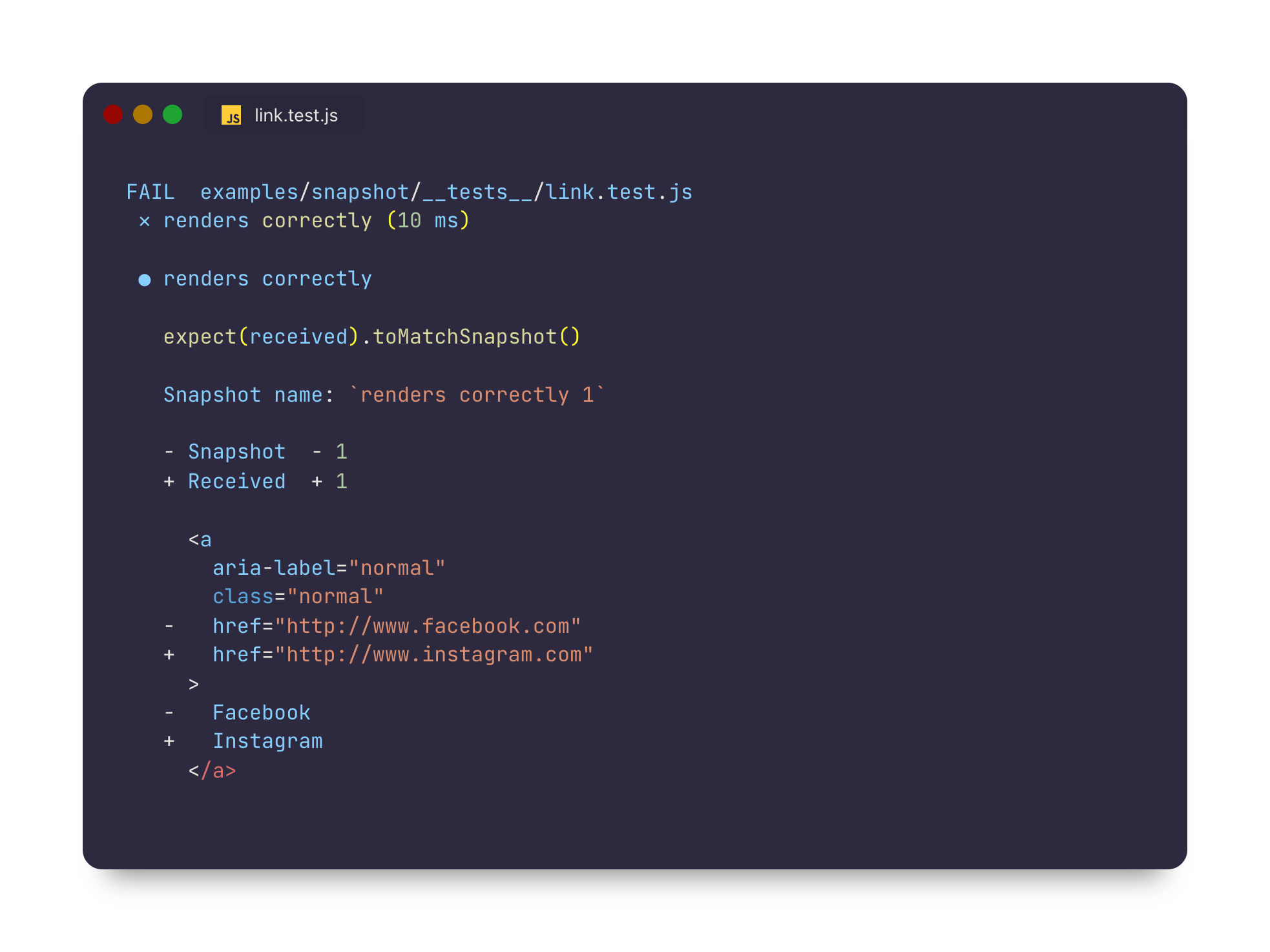
異なるアドレスを指すようにコンポーネントを更新したのですから、このコンポーネントのスナップショットに変更があると予想するのが妥当でしょう。 更新されたコンポーネントのスナップショットは今やこのテストで生成されたスナップショットと一致しないので、スナップショットのテストケースは失敗します。
これを解決するには、生成したスナップショットを更新する必要があります。 単純にスナップショットを再生成するように指示するフラグを付けてJestを実行するだけでできます。
jest --updateSnapshot
上記のコマンドを実行することで変更を受け入れることができます。 You may also use the equivalent single-character -u flag to re-generate snapshots if you prefer. このフラグは失敗する全てのスナップショットテストのスナップショットを再生成します。 意図しないバグにより追加されたスナップショットテストの失敗があれば、バグが混ざった状態でスナップショットを記録することを避けるためにスナップショットを再生成する前にバグを修正する必要があります。
If you'd like to limit which snapshot test cases get re-generated, you can pass an additional --testNamePattern flag to re-record snapshots only for those tests that match the pattern.
You can try out this functionality by cloning the snapshot example, modifying the Link component, and running Jest.
インタラクティブ・スナップショットモード
失敗したスナップショットは、ウォッチモードで対話的に更新することもできます。
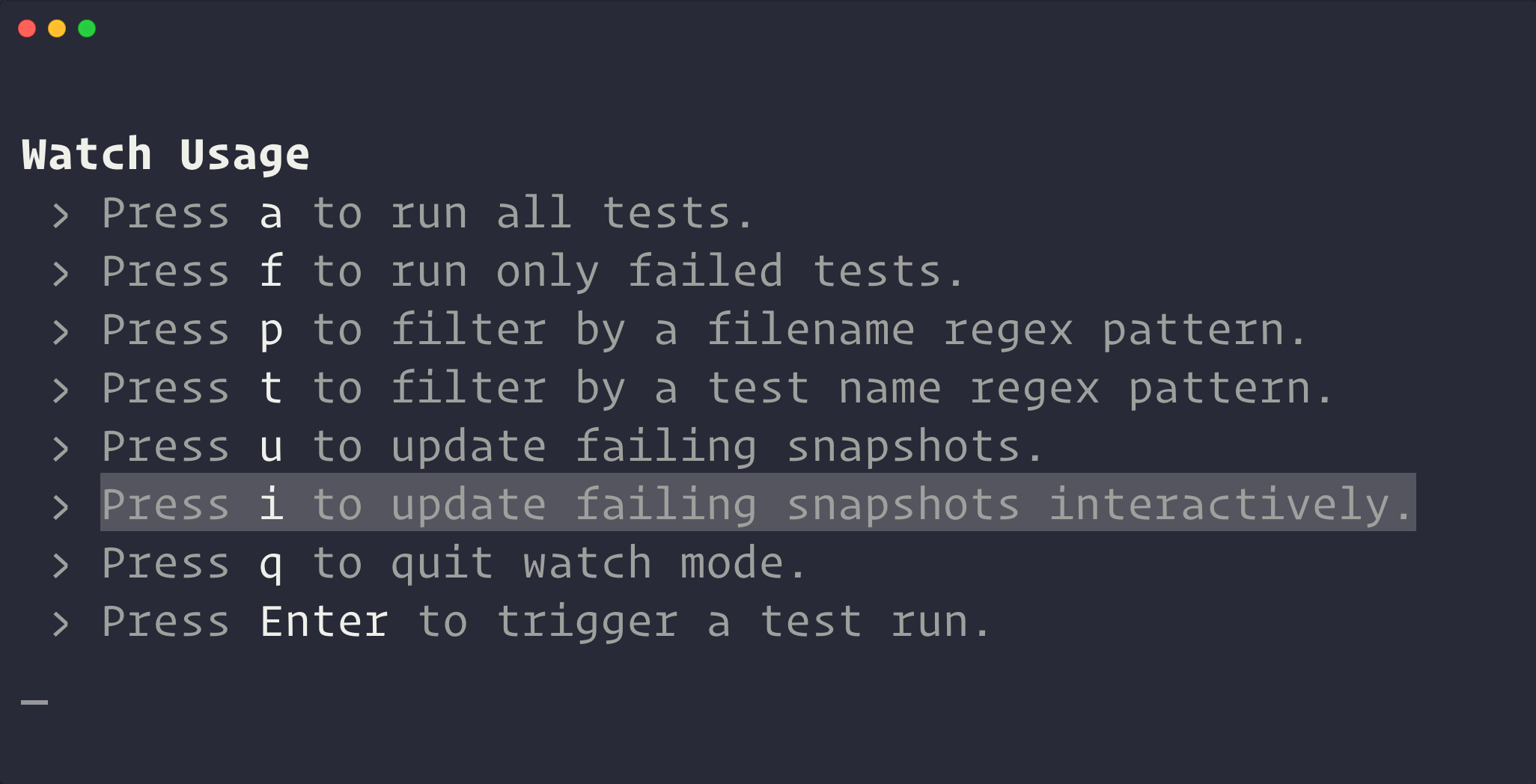
インタラクティブ・スナップショットモードに入ると、Jest は一度に1つのテストごとに、失敗したスナップショットをステップ実行させてくれます。 ここで、失敗した出力を確認できます。
ここで、スナップショットを更新するか、次にスキップするかを選択できます。

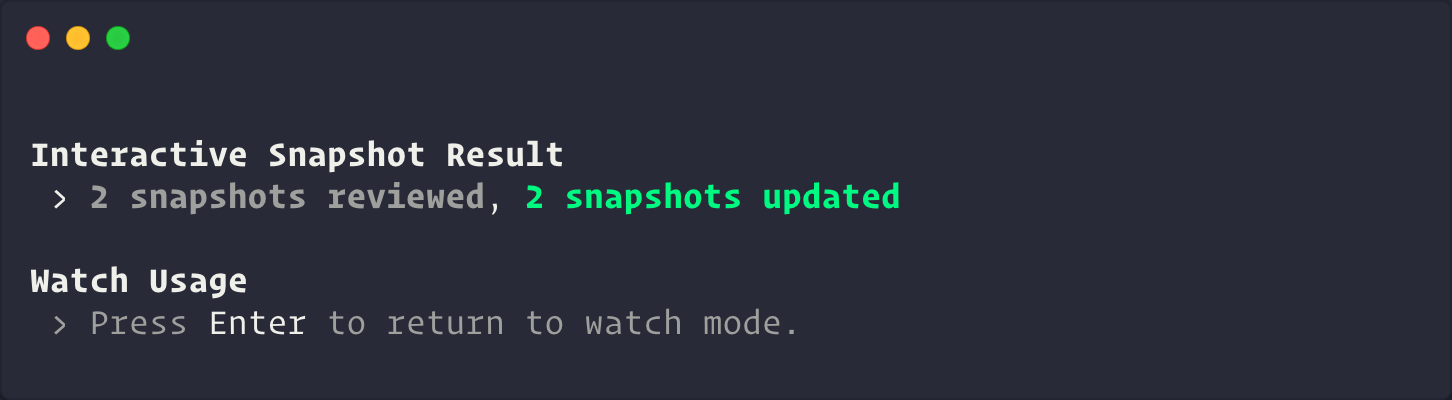
終了したら、Jest はウォッチモードに戻る前に概要を表示します。
インラインスナップショット
Inline snapshots behave identically to external snapshots (.snap files), except the snapshot values are written automatically back into the source code. つまり、外部ファイルに切り替えて正しい値が書き込まれていることを確認することなく、自動的に生成されたスナップショットの利点を得ることができます。
例:
First, you write a test, calling .toMatchInlineSnapshot() with no arguments:
it('renders correctly', () => {
  const {container} = render(
    <Link page="https://example.com">Example Site</Link>,
  );
  expect(container.firstChild).toMatchInlineSnapshot();
});
The next time you run Jest, tree will be evaluated, and a snapshot will be written as an argument to toMatchInlineSnapshot:
it('renders correctly', () => {
  const {container} = render(
    <Link page="https://example.com">Example Site</Link>,
  );
  expect(container.firstChild).toMatchInlineSnapshot(`
    <a
      aria-label="normal"
      className="normal"
      href="https://example.com"
    >
      Example Site
    </a>
  `);
});
これだけです! You can even update the snapshots with --updateSnapshot or using the u key in --watch mode.
By default, Jest handles the writing of snapshots into your source code. However, if you're using prettier in your project, Jest will detect this and delegate the work to prettier instead (including honoring your configuration).
Property Matchers
Often there are fields in the object you want to snapshot which are generated (like IDs and Dates). If you try to snapshot these objects, they will force the snapshot to fail on every run:
it('will fail every time', () => {
  const user = {
    createdAt: new Date(),
    id: Math.floor(Math.random() * 20),
    name: 'LeBron James',
  };

  expect(user).toMatchSnapshot();
});

// Snapshot
exports[`will fail every time 1`] = `
{
  "createdAt": 2018-05-19T23:36:09.816Z,
  "id": 3,
  "name": "LeBron James",
}
`;
For these cases, Jest allows providing an asymmetric matcher for any property. These matchers are checked before the snapshot is written or tested, and then saved to the snapshot file instead of the received value:
it('will check the matchers and pass', () => {
  const user = {
    createdAt: new Date(),
    id: Math.floor(Math.random() * 20),
    name: 'LeBron James',
  };

  expect(user).toMatchSnapshot({
    createdAt: expect.any(Date),
    id: expect.any(Number),
  });
});

// Snapshot
exports[`will check the matchers and pass 1`] = `
{
  "createdAt": Any<Date>,
  "id": Any<Number>,
  "name": "LeBron James",
}
`;
マッチャー以外の値はすべて正確にチェックされ、スナップショットに保存されます:
it('will check the values and pass', () => {
  const user = {
    createdAt: new Date(),
    name: 'Bond... James Bond',
  };

  expect(user).toMatchSnapshot({
    createdAt: expect.any(Date),
    name: 'Bond... James Bond',
  });
});

// Snapshot
exports[`will check the values and pass 1`] = `
{
  "createdAt": Any<Date>,
  "name": 'Bond... James Bond',
}
`;
If the case concerns a string not an object then you need to replace random part of that string on your own before testing the snapshot.
You can use for that e.g. replace() and regular expressions.
const randomNumber = Math.round(Math.random() * 100);
const stringWithRandomData = `<div id="${randomNumber}">Lorem ipsum</div>`;
const stringWithConstantData = stringWithRandomData.replace(/id="\d+"/, 123);
expect(stringWithConstantData).toMatchSnapshot();
Other ways this can be done is using the snapshot serializer or mocking the library responsible for generating the random part of the code you're snapshotting.
ベストプラクティス
スナップショットは、アプリケーション内で予期しないインターフェイスの変更を特定するための素晴らしいツールです。 UI、ログ、またはエラーメッセージのいずれであってもです。 あらゆるテスト戦略と同様に、知っておくべきベストプラクティスと、それらを効果的に使用するために、遵守すべきガイドラインがあります。
1. スナップショットをコードとして扱いましょう
スナップショットをコミットし、通常のコードレビュープロセスの一部としてレビューします。 これは、プロジェクト内の他の種類のテストやコードと同様にスナップショットを扱うことを意味します。
スナップショットは、範囲を絞り込んで短くするべきで、これらのスタイル規約を強制することで、可読性を確保するよう心がけてください。
As mentioned previously, Jest uses pretty-format to make snapshots human-readable, but you may find it useful to introduce additional tools, like eslint-plugin-jest with its no-large-snapshots option, or snapshot-diff with its component snapshot comparison feature, to promote committing short, focused assertions.
目標は、プルリクエストでスナップショットを簡単に確認できるようにすることです。 そしてテストスイートが失敗したときに失敗の根本原因を調べず、スナップショットを再作成する習慣と戦うためです。
2. べき等性のあるテストを書きましょう
テストは確定的なものであるべきです。 変更がないコンポーネントに対して同じテストを複数回実施しても毎回同じ結果が得られるべきなのです。 生成したスナップショットがプラットフォームに固有のものやその他の非確定的なデータを含まないように努めなければなりません。
For example, if you have a Clock component that uses Date.now(), the snapshot generated from this component will be different every time the test case is run. In this case we can mock the Date.now() method to return a consistent value every time the test is run:
Date.now = jest.fn(() => 1_482_363_367_071);
Now, every time the snapshot test case runs, Date.now() will return 1482363367071 consistently. これにより、いつテストを実行したかに関係なく、このコンポーネントに生成されるスナップショットは同じ結果となります。
3. 叙述的なスナップショット名を使用しましょう
スナップショットには、常に叙述的なテストやスナップショット名を使用するようにしてください。 ベストな命名は、期待されるスナップショットの内容を述るものにすることです。 これにより、レビュー中にレビュアーがスナップショットを確認しやすくなります。 更新前のスナップショットが正しい動作であるかどうかを、誰でも知ることができます。
例えば、以下を比べてみましょう:
exports[`<UserName /> should handle some test case`] = `null`;

exports[`<UserName /> should handle some other test case`] = `
<div>
  Alan Turing
</div>
`;
と
exports[`<UserName /> should render null`] = `null`;

exports[`<UserName /> should render Alan Turing`] = `
<div>
  Alan Turing
</div>
`;
Since the latter describes exactly what's expected in the output, it's more clear to see when it's wrong:
exports[`<UserName /> should render null`] = `
<div>
  Alan Turing
</div>
`;

exports[`<UserName /> should render Alan Turing`] = `null`;
よくある質問
スナップショットは継続的インテグレーションシステム(CI) では自動的に生成されないのでしょうか?
No, as of Jest 20, snapshots in Jest are not automatically written when Jest is run in a CI system without explicitly passing --updateSnapshot. 全てのスナップショットはCI上で実行されるコードの一部であることが期待され、新しいスナップショットは自動的にパスしているはずなので、CIシステム上のテストをパスするか確認するべきではないのです。 全てのスナップショットをコミットしてバージョン管理することをお勧めします。
スナップショットファイルはコミットする必要がありますか?
はい、スナップショットがカバーするモジュールとテストと共にすべてのスナップショットファイルはコミットされるべきです。 Jestの他のアサーションの値と同様に、スナップショットはテストの一部とみなされるべきです。 実際、スナップショットが指定された時点でのソースモジュールの状態を表すものなのです。 こうしてソースモジュールが変更された場合、Jestは以前のバージョンから変更があったことを見分けられるのです。 コードレビューにおいてレビュアーが加えられた変更をより理解しやすくなるたくさんの追加のコンテクストを提供するものでもあります。
スナップショットテストはReactコンポーネントでのみ利用できますか?
React and React Native components are a good use case for snapshot testing. しかしスナップショットは任意のシリアライズ可能な値をキャプチャでき、出力が正しいかをテストするという目的に対していつでも利用できるべきです。 JestのリポジトリにはJest自身のテスト結果の例や、アサーションのライブラリ、そしてコードベースの様々な部分におけるログメッセージも同様に含まれています。 See an example of snapshotting CLI output in the Jest repo.
スナップショットテストとビジュアルの回帰テストの違いは何ですか?
スナップショットテストとビジュアルの回帰テストはUIをテストする2つの独立した方法であり、目的が異なります。 ビジュアルの回帰テストツールはwebページのスクリーンショットを取得して出力された画像をピクセル単位で比較します。 スナップショットテストにおいてはシリアライズされた値をテキストファイルに格納して、異なるアルゴリズムで比較します。 There are different trade-offs to consider and we listed the reasons why snapshot testing was built in the Jest blog.
スナップショットテストは単体テストを代替するものですか?
スナップショットテストはJestに含まれる20以上のアサーションの1つに過ぎません。 スナップショットテストのねらいは既存の単体テストを代替することではなく、追加のテスト結果を提供してテストにおける作業負担を減らすことです。 一部のシナリオではスナップショットテストは特定の機能セット(例: Reactコンポーネント)における単体テストの必要性を取り去る可能性がありますが、並行して利用することもできます。
生成されたファイルのサイズと処理速度についてのスナップショットテストのパフォーマンスはどうですか?
Jestはパフォーマンスを念頭に置いた修正を実施し続けており、スナップショットテストも例外ではありません。 スナップショットはテキストファイルに保管されるので、テストは高速で信頼性が高いものになります。 Jest generates a new file for each test file that invokes the toMatchSnapshot matcher. スナップショットのサイズはかなり小さく: 参考までにJestのコードベースそのもののスナップショットファイルの総合計を例にすれば、300KB未満です。
スナップショットファイル内での競合を解決するには?
スナップショットファイルは対象とするモジュールの現在の状態を表すものでなければなりません。 したがって、2つのブランチをマージしてスナップショットファイル内での競合に出くわしたなら、手動で競合を解決するかJestを実行してスナップショットを更新して結果を確認することができます。
スナップショットテストにテスト駆動開発の原則を適用することはできますか?
手動でスナップショットを作成することもできますが、大抵はやりやすいものではありません。 スナップショットは最初期の段階でコード設計の手引きとなるよりも、テスト対象のモジュールの出力が変更されたかを分かりやすくするものです。
コードカバレッジはスナップショットテストでも機能しますか?
はい、他のテストと同様です。